A Step-by-Step Guide to Migrating to Odoo ERP Without Business Disruption
 Odoo
OdooA Step-by-Step Guide to Migrating to Odoo ERP Without Business Disruption
An Odoo ERP Migration is one of the few IT projects that can genuinely disrupt daily operations if handled poorly, which is exactly why so many UAE businesses delay a move they know they need. Done properly, migration does not have to mean downtime, lost orders, or a chaotic few weeks while staff relearn how to do their jobs. This guide walks through a realistic, step-by-step approach that keeps your business running while data, workflows, and users move to the new system.
Whether you are moving off spreadsheets, a legacy accounting tool, or another ERP platform entirely, the same core sequence applies. Skipping steps to save time is the single biggest reason migrations end up costing more time than they saved.
Migration is only one phase of a broader implementation that also includes module selection, configuration, and partner vetting, but it deserves its own detailed treatment here because it is the phase most likely to derail an otherwise well planned project.
Key Takeaways
A successful Odoo ERP Migration follows five phases: audit, clean, configure, test, and go live in controlled stages, not all at once.
Data cleanup before migration prevents legacy problems like duplicate records and inconsistent formatting from following you into the new system.
Phased go live, module by module or branch by branch, keeps daily operations running while the rest of the business transitions.
Why Odoo ERP Migration Fails Without a Plan
Most failed migrations do not fail because of the software. They fail because a business tries to move everything at once, without a clear sequence or a fallback plan if something goes wrong mid transition. An unplanned Odoo ERP Migration often starts with good intentions and ends with staff working in both the old and new systems simultaneously for weeks, which defeats the entire purpose of migrating in the first place.
A structured migration, by contrast, treats data movement as its own project phase with clear ownership, rather than an afterthought bolted onto configuration. Our full cycle Odoo implementation service treats migration as a distinct, tracked phase precisely because rushing it is where most timelines and budgets go wrong.
The businesses most at risk of a disruptive migration are the ones with multiple data sources feeding daily operations, such as a separate accounting tool, a CRM spreadsheet, and a manual inventory count all running in parallel. Reconciling these into one clean dataset before migration begins is what separates a smooth Odoo ERP Migration from one that drags on for months while staff patch data gaps after the fact.
Step 1 and 2: Audit Your Data and Clean It Before Moving
Every migration should start with a full audit of what data actually exists and where it lives, whether that is an old accounting platform, a CRM spreadsheet, or paper records that were never digitized. This audit, usually run as part of an Odoo consultation and process analysis, tells you exactly what needs to move and what can safely be archived instead.
Data cleanup is the step most businesses want to skip, and it is the one that matters most. Duplicate customer records, inconsistent product naming, and incomplete historical transactions all cause problems after go live if they are not fixed beforehand. Our best practices guide for error free data migration walks through exactly what proper cleanup involves before any records touch the new system.
It also helps to decide upfront what does not need to migrate at all. Not every historical record needs to live in the new system on day one. Archiving old, closed transactions separately, rather than dragging years of inactive data into Odoo, keeps the new database faster and the migration itself considerably lighter to test and validate.
Step 3 and 4: Configure the System and Run a Test Migration
Once data is clean, configuration maps each legacy field to its destination inside Odoo, including chart of accounts, inventory categories, and customer records. This is also when UAE VAT rules, approval workflows, and user permissions get set up to match how your business actually operates, not a generic default template.
This is also the point where industry specific configuration happens. A construction and contracting business maps project codes and job costing structures, while a trading company using the trading, manufacturing and van sales solution configures multi warehouse stock rules. Getting this mapping right before migration avoids a second round of rework once real data starts flowing through the system.
A test migration with a sample dataset, run before the full Odoo ERP Migration, catches formatting errors, mismatched fields, and broken relationships between records while the stakes are still low. Businesses that skip this step and migrate everything in one pass often discover errors only after go live, when fixing them is far more disruptive to daily operations.
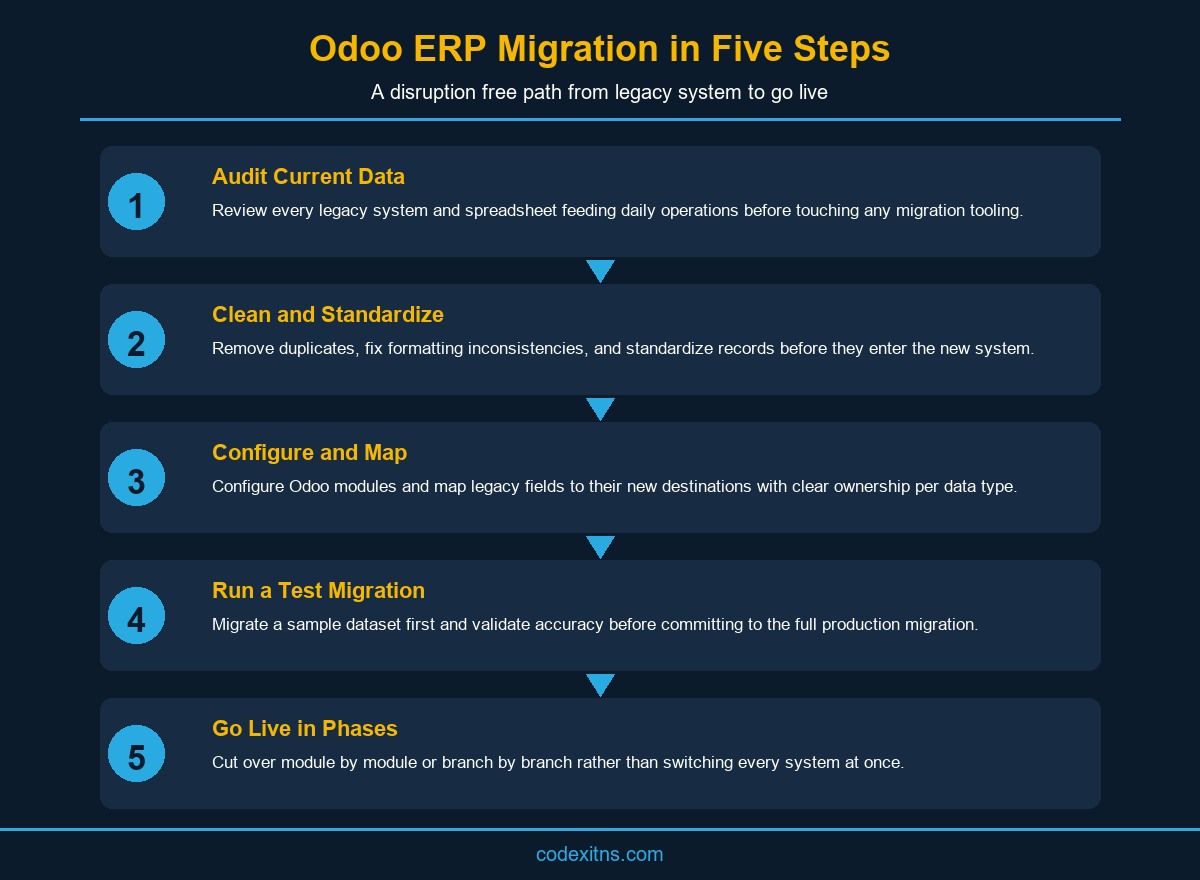
Step 5: Go Live Without Disrupting Daily Operations
The final step is where disruption actually gets avoided or created. Migrating module by module, or branch by branch for multi location businesses, keeps most of the operation running normally while each piece transitions on its own schedule. A trading company might migrate inventory and sales first, then accounting a few weeks later, rather than switching every function on the same day.
Running the old and new systems in parallel for a short, clearly defined window gives staff a safety net without extending the transition indefinitely. Our guide on strategies for smooth post go live operations covers how to manage this window without letting it drag on longer than planned.
Support during this window matters more than most businesses expect. Real usage always surfaces questions discovery could not fully anticipate, which is why post go live support and maintenance should be budgeted generously for the first few weeks after each phase goes live, not treated as an optional extra once the migration itself is technically complete.
Common Migration Mistakes to Avoid
Migrating without a rollback plan is the most common mistake. If something goes wrong during cutover, a business needs a clear path back to the old system for a defined period, not a scramble to figure out what to do next. The second common mistake is underestimating how long data cleanup actually takes, which is usually the longest phase of the entire Odoo ERP Migration timeline, not the shortest.
Businesses migrating from Tally or another accounting specific tool face a slightly different set of considerations around chart of accounts mapping, which experienced Odoo Implementation Services providers account for during the audit phase rather than discovering mid migration. Skipping staff training until after go live is the third mistake, since a system nobody knows how to use correctly creates the exact disruption a careful migration was meant to avoid.
Treating the Odoo ERP Migration partner selection as an afterthought is the final mistake worth naming. Our guide on choosing your Odoo partner in Dubai covers the specific questions worth asking about migration experience before committing to a provider, since not every implementer handles data migration with the same discipline.
Conclusion
Odoo ERP Migration does not have to mean weeks of disruption if it is treated as a structured project with clear phases: audit, clean, configure, test, and a phased go live. Businesses that rush this process to save time consistently spend more time fixing problems after launch than they would have spent doing it properly the first time.
Codex handles migration as a dedicated phase of every implementation, with a test migration and rollback plan built in before go live. Contact us to plan a migration that keeps your business running while you move to Odoo.
Related solution: Odoo Van Sales Solution explains how Codex handles this workflow for UAE businesses.
Need a van sales rollout for your field team? Review the Codex van sales solution for route planning, mobile ordering, stock control, invoicing, payments, and daily reporting. Explore Odoo Van Sales Solution or talk to Codex for a guided consultation.
Frequently Asked Questions
How long does an Odoo ERP migration typically take?

Most migrations take two to six weeks depending on data volume and complexity, with data cleanup usually taking longer than the Odoo Implementation Services technical migration itself.
Can I migrate to Odoo without stopping daily operations?
Yes. Phased migration by module or branch, combined with a short parallel running window covered by post go live support and maintenance, lets most of the business continue operating normally during the transition.
What data should be cleaned before an Odoo ERP migration?
Duplicate customer and product records, inconsistent naming conventions, and incomplete historical transactions should all be resolved before data enters the new system, as covered in our error free data migration guide.
Is a test migration really necessary?
Yes. A test migration with sample data catches formatting and mapping errors while the stakes are low, before a full full cycle Odoo implementation commits every record at once.
Can I migrate from Tally to Odoo ERP?
Yes. Migrating from Tally involves specific chart of accounts mapping considerations, and Codex has direct experience handling this transition through our Odoo consultation and process analysis service for UAE trading and SME businesses.
What happens if something goes wrong during migration?
A proper migration plan includes a rollback option for a defined window after go live, backed by post go live support and maintenance, so a business can revert to the old system if a critical issue surfaces.
Should staff be trained before or after migration?
Before. Training staff ahead of go live, as part of a proper Odoo consultation and process analysis, prevents the exact operational disruption a careful migration is meant to avoid.
Does Odoo ERP migration include UAE VAT setup?
Yes. VAT configuration is typically handled during the configuration phase, ensuring invoicing and reporting are compliant with UAE Federal Tax Authority requirements from day one.
How much does an Odoo ERP migration cost?
Cost depends on data volume and complexity, and is usually scoped as part of the broader Odoo Implementation Services quote rather than priced as a fully separate line item.
Where can I get help planning an Odoo ERP migration in the UAE?
Codex offers a free consultation to assess your current data and build a migration plan. Visit our About page to learn more about our track record as a UAE Odoo Silver Partner.